

Why Is My Drone GPS Signal Weak? Causes and Fixes
Quick answer: Move the drone to an open outdoor area with a wide view of the sky. Set it on a firm, level surface, power it on, and leave it still for 30–60 seconds while it searches for satellites. Do not take off until the controller shows the model-specific GPS-ready status and, when supported, confirms the home point.
For current TODAMU support, wait for at least seven satellites when the controller displays a satellite count, but do not treat seven as a universal rule. The ready indicator and home-point confirmation take priority because satellite geometry and signal quality matter as well as the number. If GPS remains weak, remove metal stickers or accessories from the top shell, restart, update the model’s firmware, and stop flying far until the cause is clear.
A weak drone GPS signal is usually an environment or startup issue, not proof that the aircraft is broken. Indoor roofs, tall buildings, bridges, dense trees, cliffs, metal structures, and reflected satellite signals can all reduce positioning quality. A cold start after travel or long storage can also take longer than a normal startup.
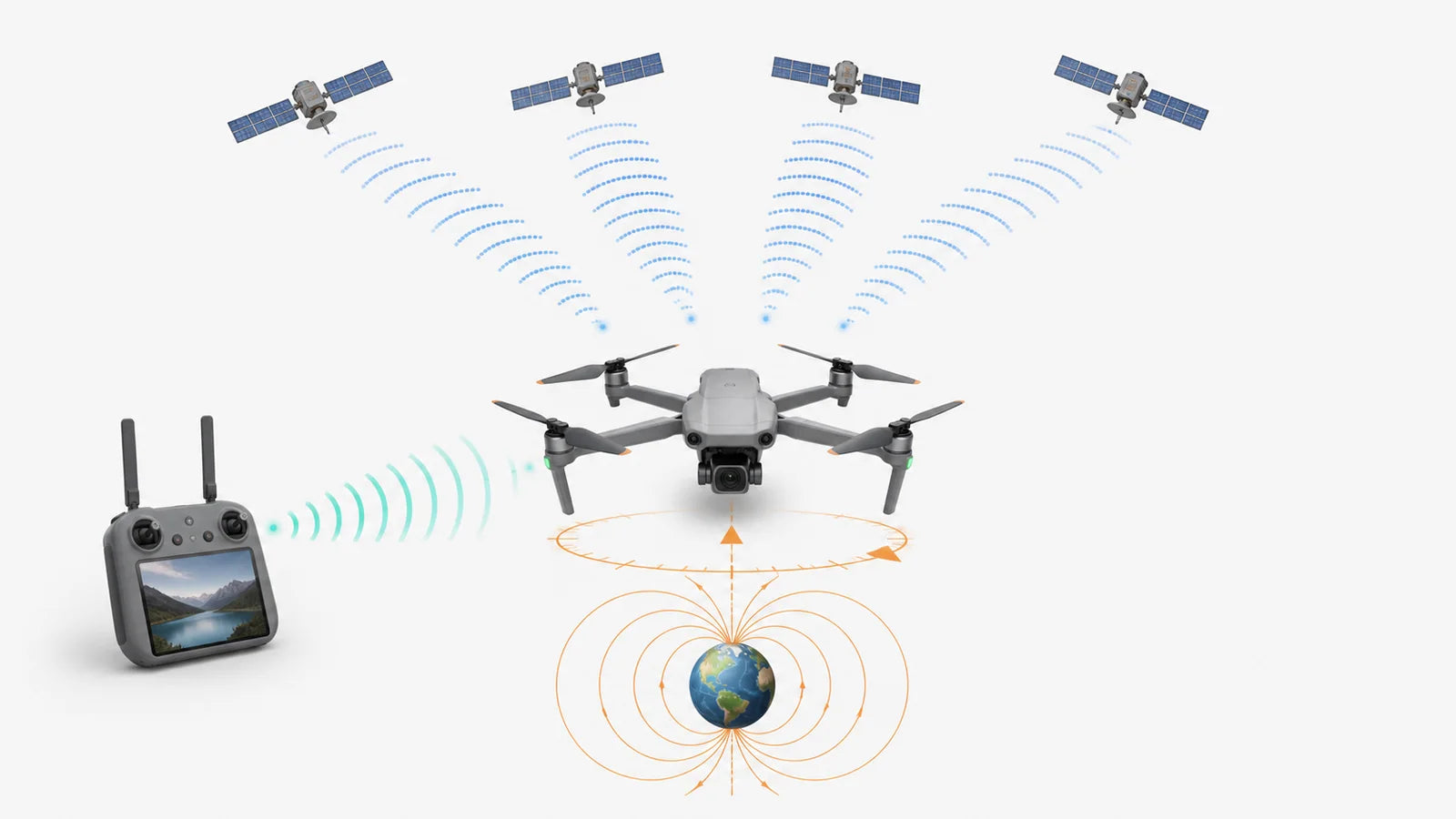
The first useful question is not simply “Why is my drone signal weak?” It is which signal is weak. GPS/GNSS positioning, the controller link, the video feed, and the compass do different jobs. The correct fix depends on identifying the right system before changing settings or calibrating anything.
Is the Problem GPS, Controller Signal, Video Signal, or the Compass?
GPS is a satellite-positioning system. It helps the aircraft estimate where it is, hold an outdoor position, record a home point, and support GPS-based return functions. It does not carry your stick commands or live camera feed.
The controller link carries flight commands, while the video link sends the live camera view back to the screen or phone. Depending on the model, those two radio links may share part of the same transmission system. The compass is different again: it measures heading. A compass warning can make flight behavior look abnormal, but it does not automatically mean the aircraft is receiving fewer satellite signals.
If the GPS status is normal but the control bars or live view become weak, use the controller antenna position and signal checklist. It covers antenna direction, body and metal obstruction, local interference, and physical damage.
| What you see | System involved | What it may affect | First action |
|---|---|---|---|
| Weak GPS, no GPS, low satellite count, or home point not ready | GPS/GNSS positioning | Position hold, home point, GPS return, waypoint or follow features | Move to open sky, wait with the drone still, and confirm GPS-ready status |
| Controller signal bars fall or the aircraft stops responding | Control radio link | Stick commands and manual control | Stop flying farther, improve line of sight, orient the controller correctly, and bring the drone closer |
| Live view freezes or becomes blocky while control still works | Video transmission link | Framing and screen view, but not always control | Reduce distance and obstruction; do not assume GPS has failed |
| Incorrect map heading or compass interference warning | Compass / magnetometer | Heading and direction used by flight logic | Move away from metal and electrical equipment; calibrate only if the model requests it |
If the controller or video link is the actual problem, use the drone signal-loss and return-home guide. If the warning specifically says GPS, GNSS, satellite positioning, or home point not ready, continue with this checklist.
What Does a Weak GPS Signal Mean on a Drone?
A weak GPS signal means the aircraft does not yet have a positioning solution that its flight system considers reliable enough for normal GPS-assisted behavior. It may still receive some satellites, but the signals can be blocked, reflected, poorly arranged across the sky, or not yet processed into a stable position.
This is why satellite count alone does not tell the full story. Seven satellites spread well across an open sky can be more useful than a similar count crowded into one visible gap between buildings. The U.S. government’s GPS accuracy guidance lists satellite geometry, signal blockage, atmospheric conditions, and receiver design among the factors that affect the position a user receives.
What changes when GPS is not ready?
- The drone may not hold its horizontal position as accurately.
- The home point may not be recorded or may not be reliable.
- GPS-based return-to-home may be unavailable or less accurate.
- Waypoint, orbit, follow, and other position-dependent functions may be restricted.
- The aircraft may depend more on optical flow, altitude hold, IMU data, and manual correction.
- Drift becomes more likely when wind or the ground-sensing environment is unfavorable.
No GPS does not always mean no control. The controller may still command the drone, but position hold and GPS return support can be reduced. Do not launch far or high to test the warning. If the model allows flight without GPS, keep it low and close in a clear area—or postpone the flight.
To understand why this can become visible as sideways movement, follow the separate drone drift troubleshooting guide. To compare what GPS adds before purchase, see GPS drone vs non-GPS drone.
Why Is My Drone GPS Signal Weak?
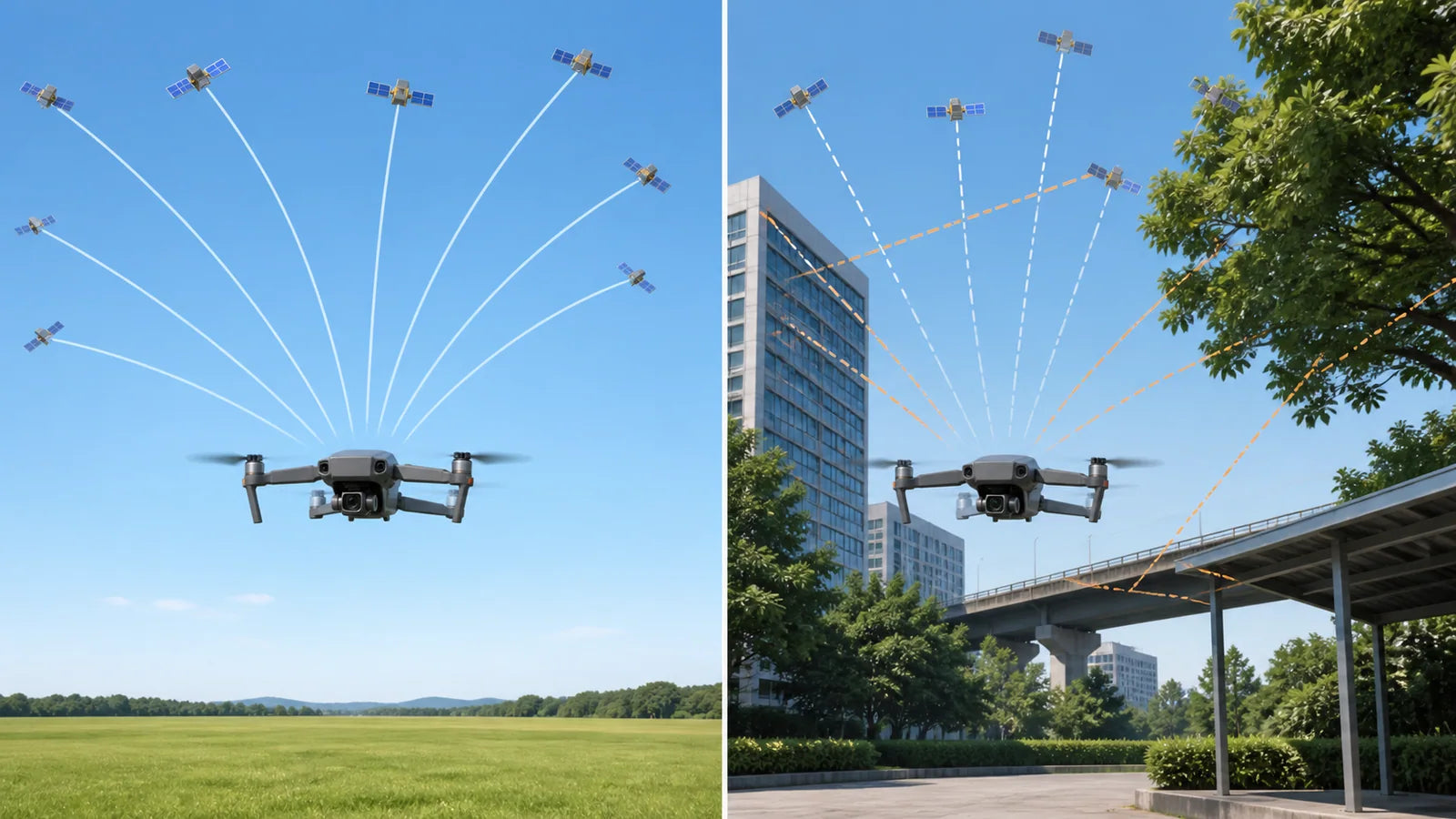
The most common cause is a limited view of the sky. GPS signals travel from satellites to a small receiver in the aircraft, so a roof, bridge, building, tree canopy, cliff, or metal structure can block part of that path. Buildings and walls can also reflect the signals, creating multiple delayed paths that reduce positioning accuracy.
| Situation | Why GPS can be weak | What to do |
|---|---|---|
| Indoors, under a roof, inside a metal shed, or below a bridge | The structure blocks much of the sky and may reflect signals | Move outdoors; do not rely on GNSS position hold indoors |
| Between tall buildings, beside a large wall, or in a narrow street | Blocked sky view and multipath reflections reduce position quality | Use a larger open launch area away from the building face |
| Under dense trees, in a canyon, or close to a cliff | Foliage and terrain hide satellites in several directions | Move to a clearing with more visible sky |
| Just powered on after travel, long storage, or a large location change | The receiver may need a longer cold-start search | Leave the aircraft still in open sky and wait for ready status |
| Metal sticker, magnetic mount, tracker bracket, or accessory on the upper shell | The accessory may obstruct the antenna area or disturb nearby sensors | Remove nonessential metal or magnetic accessories and restart |
| Warning began after a crash or hard landing | The GPS antenna, module, connector, top shell, or related hardware may be damaged | Stop long-distance flight, inspect externally, and contact support if the problem remains |
| GPS is weak only at one launch point | Local obstruction, reflection, or electrical/magnetic interference is more likely than a failed receiver | Move the launch point before changing calibration |
| Several unrelated devices show unusual GPS behavior in the same area | A wider service anomaly, interference event, or space-weather effect is possible but uncommon | Do not fly; check official status information and try another time or location |
How Do You Fix a Weak GPS Signal on a Drone?
Use the least invasive steps first. Do not begin by opening the aircraft or repeatedly calibrating every sensor. Test after each step so you know whether the environment, startup time, accessory, firmware, or hardware changed the result.
- Move to open sky. Leave indoor rooms, covered patios, metal roofs, bridges, narrow streets, tall building faces, and dense tree cover.
- Use a firm, level launch point. Keep the drone away from a car roof, metal table, reinforced-concrete edge, power cabinet, or large electrical equipment.
- Leave the aircraft still. Power on the drone and controller, then wait 30–60 seconds before judging the result. A cold start may take longer.
- Watch the model-specific status. When a satellite count is shown, TODAMU support recommends at least seven before takeoff; still wait for the GPS-ready and home-point confirmation required by the model.
- Restart once. Power-cycle the aircraft and controller after moving to the better location. Confirm the date, time, app, and firmware are current where the model uses them.
- Remove nonessential metal or magnetic accessories. Take off metal stickers, magnetic mounts, or improvised brackets near the upper shell, then retest.
- Check the compass warning separately. Move away from interference first. Use compass calibration only when the controller or manual calls for it or the heading is clearly wrong.
- Inspect crash history. If the warning began after an impact or remains in several open locations, stop testing at distance and contact support.
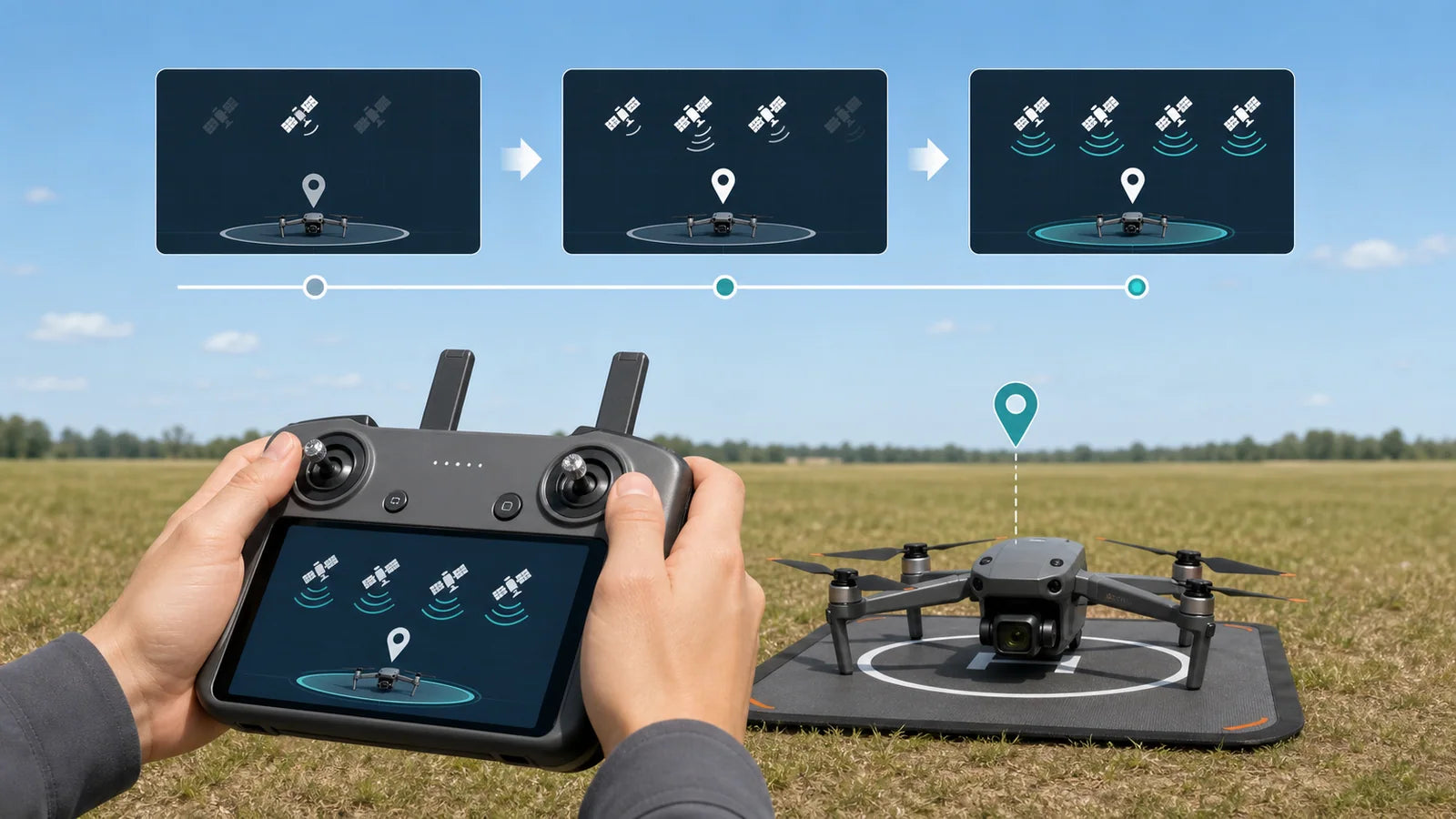
Why the time can vary: A normal restart in a familiar open location may acquire a position quickly. A cold start after travel or long storage can take longer. Do not turn 30–60 seconds into a deadline; wait for the status the aircraft requires.
Can Compass Interference Cause a Weak GPS Warning?
Compass interference and weak GPS can appear together, but they are not the same measurement. The GPS/GNSS receiver estimates position from satellite signals. The compass estimates heading from the local magnetic field. Metal structures, power equipment, magnets, reinforced concrete, or an unsuitable launch surface can disturb the compass even when satellite reception itself is acceptable.
Move the aircraft first. If the compass warning disappears a few meters away from the original launch point, the location was probably the problem. Do not calibrate beside the same metal or electrical source, because calibration can record a distorted magnetic field as its reference.
Follow how to calibrate a TODAMU drone only when the controller requests compass calibration, the heading is clearly wrong, or the model procedure calls for it. Recalibrating the compass does not open the sky, fix a blocked GPS antenna, or repair crash damage.
Can Metal Accessories or a Crash Affect Drone GPS?
Yes. A metallic sticker, magnetic mount, tracker bracket, improvised payload hardware, or other accessory placed over the upper aircraft body may obstruct the receiver area or disturb nearby sensors. The exact antenna location differs by model, so the safest rule is to avoid attaching metal or magnetic items to the shell unless the model documentation approves them.
Power the aircraft off before inspection. Remove only external accessories that can be taken off without tools or force. Look for an impact mark, cracked top shell, loose panel, displaced accessory, or deformation near the upper body. Do not open the shell or press on an internal module unless authorized service instructions tell you to do so.
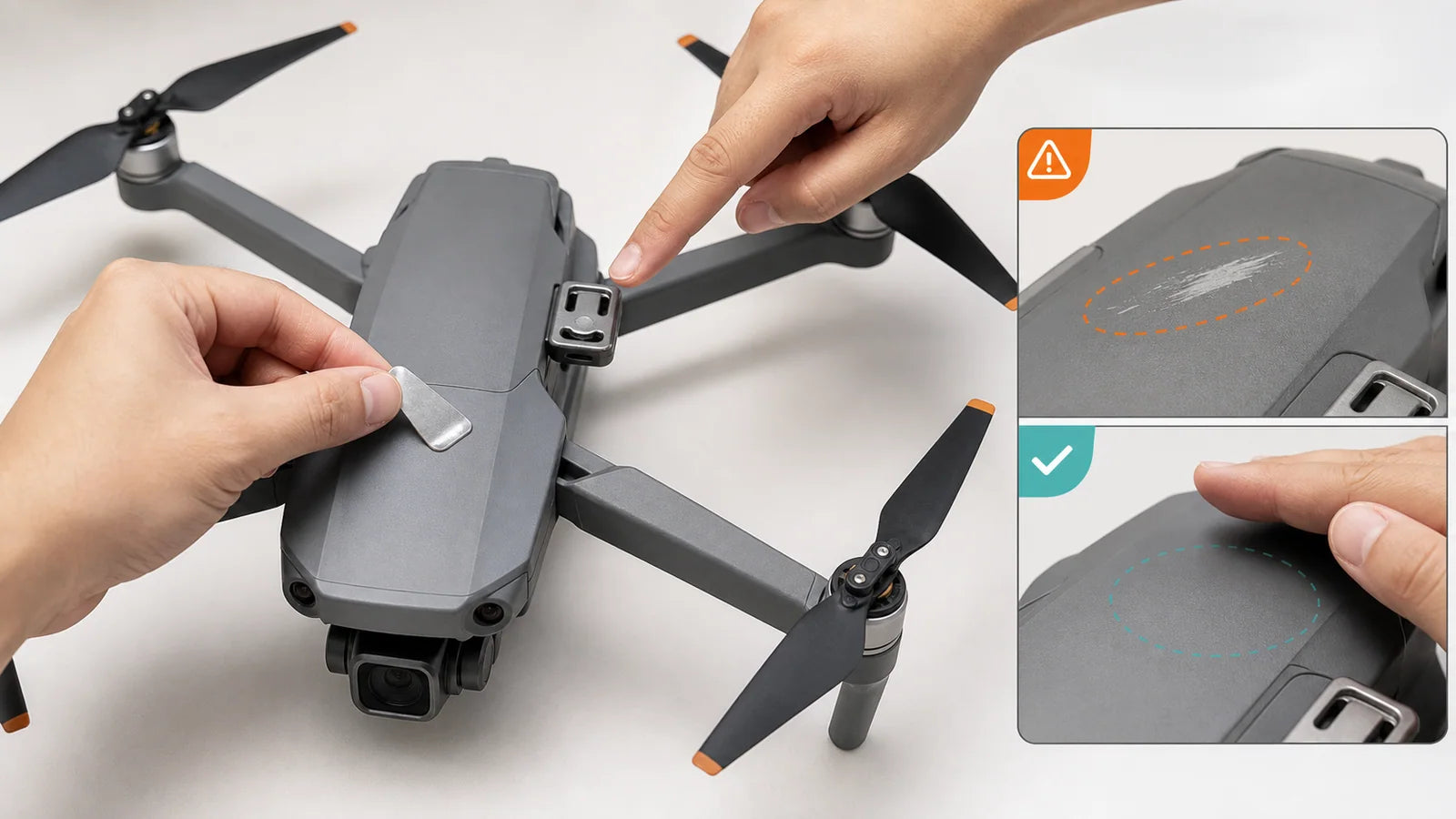
If the GPS warning began immediately after a crash, appears in several open locations, or the controller never reaches its normal positioning state, treat it as a possible antenna, module, cable, or flight-controller problem. Stop flying far and send TODAMU support the model name, warning screenshot, launch environment, satellite count, crash history, and a short startup video.
What Should You Do If GPS Becomes Weak During Flight?
Keep the drone visible and reduce risk immediately. Do not continue outward to see whether the signal returns. The aircraft may still respond to the controller, but its position hold, braking behavior, home-point accuracy, or GPS return support may be reduced.
- Stop increasing distance or altitude. Keep the aircraft in sight and avoid abrupt inputs.
- Move toward clearer sky if it is safe. Do not fly deeper behind a building, tree canopy, roof edge, cliff, or bridge.
- Bring the drone closer. Use smooth manual control and expect more drift if GPS position hold is reduced.
- Descend into a safe open area. Avoid people, traffic, water, wires, trees, and roofs.
- Land and troubleshoot on the ground. Check the warning, location, satellite count, compass status, accessories, and impact history before another flight.
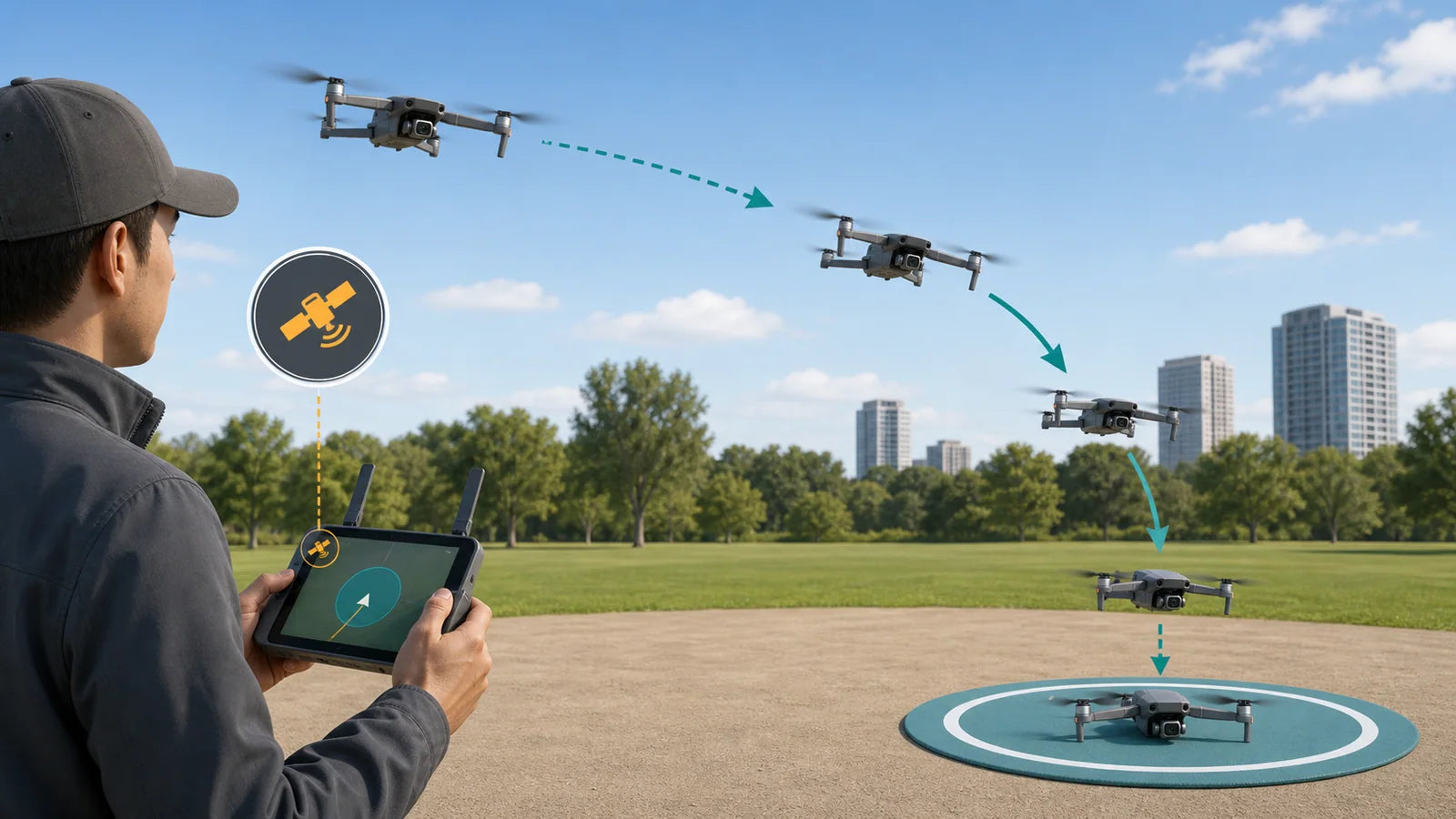
Do not assume return-to-home will solve weak GPS. GPS-based return needs a usable position and a valid home point. If the satellite-positioning warning is the problem, a calm manual return and early landing may be safer than waiting for an automatic response.
If the controller or video feed is lost while GPS remains healthy, that is a different branch. Read what a drone may do after controller signal loss and learn the exact failsafe behavior of your model before flying farther.
Why Does GPS Take Longer After Travel or Long Storage?
A receiver that has recent satellite information and has not moved far can often establish a position faster. After long storage, a large location change, or a fully powered-down period, it may need more time to update satellite information and calculate a new position. This is commonly described as a cold start.
Place the drone outdoors with open sky, keep it still, and wait. Avoid repeatedly moving it between indoor and outdoor locations or restarting every few seconds. If the controller eventually reaches the normal ready status and behaves consistently in later starts, the longer first wait was probably not a fault.
Can space weather or a wider GPS disruption be the cause?
It is possible, but much less common than an obstructed launch point, cold start, accessory, or aircraft issue. NOAA explains that geomagnetic storms can disturb the ionosphere and reduce GPS accuracy or, in severe cases, cause loss of lock. See the NOAA space-weather overview.
If several unrelated GPS devices behave abnormally in the same area and time, postpone the flight and check the official GPS service outage and status resources. If only one drone has the problem in multiple open locations, equipment or firmware is more likely.
What Should You Check on a TODAMU GPS Drone?
On a TODAMU model that displays satellite count, use seven satellites as the current minimum support baseline, then wait for the aircraft’s normal GPS-ready and home-point confirmation before takeoff. A higher count may be required by a particular model or environment before the controller shows ready. The screen status—not the number alone—makes the final decision.
| TODAMU situation | What to check | Next step |
|---|---|---|
| New GPS camera drone will not show ready | Open-sky location, controller status, home point, startup wait, model instructions | Keep the aircraft still; restart once in the open location |
| Wing Lite or another beginner GPS model shows weak GPS | Indoor/covered launch, nearby wall or trees, metal surface, satellite count | Move to a larger open field before trying calibration |
| WindForce Mini, WING 6S, WING 3S, Wing One, or WindForce X warning began after impact | Top-shell damage, loose accessories, repeated warning in more than one open location | Do not use a long-range test; contact support |
| GPS is ready but the controller or video bars are weak | Distance, obstacles, controller orientation, radio interference | Use the signal-loss guide; this is not the GPS branch |
| Compass warning appears beside metal or reinforced concrete | Local magnetic environment and real map heading | Move first; calibrate only if still requested in a clean location |
Need model-specific help? Use the TODAMU contact page and include the exact model, controller warning, satellite count, location type, whether the home point was recorded, whether the problem followed a crash, and what changed after moving to open sky.
If you are choosing a first GPS model rather than troubleshooting one, compare TODAMU beginner drones. Wing Lite is the simpler screen-controller GPS starting point, while WindForce X is built for longer planned outdoor sessions. Product range never replaces the preflight GPS-ready and home-point checks.
How Can You Prevent Weak GPS Before Takeoff?
- Choose an outdoor launch area with a broad view of the sky.
- Avoid starting under roofs, bridges, dense trees, beside tall walls, or inside metal structures.
- Do not launch from a car roof, metal table, or reinforced-concrete edge.
- Keep the aircraft still while it searches for satellites.
- Wait for the model’s GPS-ready and home-point confirmation.
- Use the satellite count as one indicator, not the only indicator.
- Remove unapproved metal or magnetic accessories from the aircraft shell.
- Check firmware and model instructions when the warning repeats.
- Inspect the drone after a crash before trying a distant test flight.
- Learn the difference between weak GPS and a weak controller/video link.
For a complete first-flight sequence, follow how to fly a drone. To understand the GPS module, compass, controller, antennas, optical-flow sensors, and flight controller as one system, read the main parts of a drone. If a GPS or sensor warning prevents takeoff entirely, use the separate drone takeoff checklist.
Frequently Asked Questions
How do I fix a weak GPS signal on my drone?
Move outdoors to a clear area, place the drone on a firm level surface, and leave it still for 30–60 seconds or longer if needed. Wait for the model-specific GPS-ready and home-point confirmation. Remove metal or magnetic accessories, restart once, and do not fly far if the warning remains.
How can I make my drone GPS signal stronger?
You cannot boost the satellites from the controller. Improve reception by giving the aircraft a wider view of the sky, moving away from roofs, buildings, bridges, cliffs, and dense trees, keeping the drone still during startup, and removing unapproved metal or magnetic accessories near the aircraft body.
Why does my drone keep losing GPS signal?
Repeated GPS loss can come from changing sky obstruction during flight, reflected signals near buildings, dense trees, local interference, a loose accessory, firmware trouble, or impact damage. If it happens in several open locations, stop long-range flight and contact support.
How many satellites should a drone have before takeoff?
The requirement is model-specific. For current TODAMU support, wait for at least seven satellites when the count is shown, then confirm the controller’s normal GPS-ready and home-point status. Do not use seven as a universal rule for every drone.
Does drone GPS work indoors?
Some satellite signals may reach a receiver near a window, but reliable GNSS position hold should not be expected indoors. Roofs, walls, metal, and reinforced structures block or reflect signals. Use the model’s indoor positioning mode only where the manual permits it.
Can trees block a drone GPS signal?
Yes. Dense leaves and branches can block part of the sky and weaken satellite reception, especially when combined with nearby buildings, cliffs, or terrain. Move to a clearing and wait for the ready status before takeoff.
Is weak GPS the same as weak controller signal?
No. GPS/GNSS tells the drone where it is. The controller link carries flight commands, and the video link carries the camera view. One system can be weak while another still works normally.
Can compass calibration improve GPS reception?
Compass calibration can correct heading data when the model requests it, but it does not open a blocked view of the sky or strengthen satellite radio signals. Move away from metal and electrical interference first, and calibrate only in a suitable location.
Can metal stickers affect drone GPS?
They can. A metallic or magnetic accessory on the aircraft shell may obstruct the receiver area or disturb nearby sensors. Remove unapproved accessories and retest without opening the drone.
Why does GPS take longer after traveling?
A large location change or long storage can make the receiver perform a colder start and gather updated satellite information. Keep the aircraft still under open sky and wait for the model’s ready indication rather than relying on a fixed countdown.
Can I fly a drone without GPS?
Only if the model permits it and the pilot understands the reduced position hold and return support. Keep the drone low, close, and in a clear area, or postpone the flight. Do not use a non-GPS test as a substitute for fixing a repeated warning.
Why does my TODAMU drone say GPS signal weak?
The most common reasons are a covered or obstructed launch area, not enough startup time, metal or magnetic accessories, a separate compass warning, firmware trouble, or impact damage. Move to open sky, wait for at least seven satellites when the count is shown plus the normal ready/home-point status, then contact TODAMU if the warning repeats in multiple open locations.